
Stocktaking Service for Multi-Store Retailers: How Multi-Site Stocktakes Become Easier to Plan
What Makes Stocktaking Across Multiple Stores So Complex?
The same challenges recur in many stocktaking projects: inconsistent counting-area structures, dates that are rescheduled at short notice, unclear responsibilities between stores and head office, and items that are physically on the shelf but missing from the master data.
There is also the challenge of coordinating external counting providers. Their staff first need to familiarise themselves with the store or warehouse layout and the logic of the product range – knowledge that in-house employees already have from day-to-day operations, for example when dealing with returnable deposit items, opened packaging units or promotional areas.
Outsourcing can be particularly difficult to justify economically for smaller sales areas of around 200 to 300 square metres. The retailer’s own team is already on site, whereas an external provider has to travel to each individual store. In many cases, a more cost-effective model is therefore to carry out the count internally while sourcing the required technology, software and support externally.
How Does a Digital Stocktake with Handheld Mobile Computers Work in Practice?
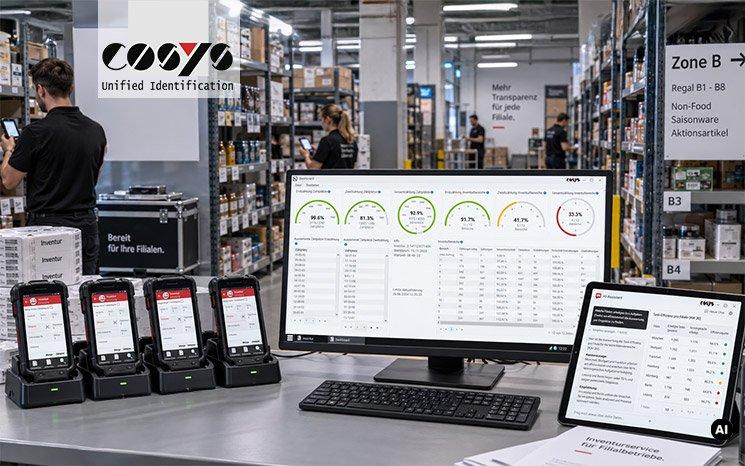
The COSYS Stocktaking Service supports the entire digital stocktaking process, from preparation through to the transfer of stocktaking data to the merchandise management system.
The process begins several weeks before the counting day with the cleansing and import of item master data. On this basis, counting areas and counting locations are defined, the Stocktaking App is deployed to the rental handheld mobile computers, and the devices are supplied preconfigured.
On the fixed stocktaking date, employees record stock barcode by barcode. The captured data can be transferred to the backend at short intervals rather than being uploaded in a single batch at the end of the day. Initial counts and verification counts, plausibility checks and targeted recounts for quantity or value outliers can be carried out in parallel. The completed stocktaking data is then exported to the merchandise management system.
The COSYS Stocktaking Service combines this workflow in an integrated package comprising stocktaking software, the Stocktaking App, preconfigured rental devices from Zebra, Honeywell or Datalogic, device management via COSYS MDM, and support during the stocktaking period.
The rental devices remain centrally managed through MDM, allowing configurations and updates to be distributed consistently across multiple locations.
What Role Do Master Data and ERP Integration Play?
The proportion of scans that can be matched directly to existing item records has a major impact on the amount of follow-up work required. Every item without a corresponding system record must later be checked and assigned manually.
Clean master data and bidirectional integration with SAP, Navision, Infor or other ERP systems help reduce this effort. Captured data, master data and stock information can also be linked and exported in the structure required by the company rather than having to conform to a rigid standard format.
How Can Head Office Monitor Multiple Stores at the Same Time?
Multi-site dashboards in COSYS WebDesk provide an overview of counting progress and status by store, area and counting location in near real time. The stocktaking management team can identify which locations are falling behind and reallocate staff or devices before the schedule is affected.
Historical stocktaking data also enables year-on-year analysis of capture times, discrepancies and error rates. This complete traceability can also support audit requirements and subsequent review.
What Does AI Add to Stocktaking Analysis?
With COSYS Business Intelligence and COSYS AI, stocktaking data can also serve as a basis for further analysis.
An AI chatbot with access to actual stocktaking data can answer questions in plain language, such as which store has the highest discrepancy rate within a particular product group, at which counting locations recounts were required unusually often, or where stock has remained unmoved across multiple periods.
AI-assisted anomaly detection can also help highlight unusual patterns or outliers before they become more difficult to investigate during subsequent analysis.
Practical Tip: Do not run the test at your model store. Choose the location with the most challenging outdoor storage area. If the counting-area logic works there, it is much more likely to work across the rest of the store network.
Would you like to make multi-site stocktakes easier to plan, manage centrally and analyse reliably?
Contact the COSYS team for individual advice on the Stocktaking Service, including stocktaking software, rental handheld mobile computers, ERP integration and centralised progress monitoring. Schedule an appointment by emailing vertrieb@cosys.de or calling +49 5062 900 0.
Alternatively, you can test the free COSYS Stocktaking Demo App for Android and iOS.
Die COSYS Ident GmbH mit Sitz in Grasdorf (bei Hildesheim) besteht seit knapp 40 Jahren und ist eines der führenden Systemhäuser im Bereich mobiler Datenerfassungslösungen für Android und Windows. Ein mittelständisches Unternehmen, das seit 1982 die Entwicklung von Identifikationssystemen vorantreibt und heute branchenspezifische Komplettlösungen für nahezu alle gängigen Geschäftsprozesse anbietet. Vom Prozessdesign und der Konzepterstellung, über die Implementierung der Hard- und Software bis hin zum Projektmanagement und maßgeschneiderten Wartungsverträgen, decken wir das komplette Leistungsspektrum der Systementwicklung, Integration und Betreuung ab. Des Weiteren bietet COSYS einen Reparaturservice, WLAN-Funkvermessung, sowie Lösungen für die Bauteil-Rückverfolgung mittels DPM-Codes.
Cosys Ident GmbH
Am Kronsberg 1
31188 Holle – Grasdorf
Telefon: +49 (5062) 900-0
Telefax: +49 (5062) 900-30
http://www.cosys.de
